
백신 프로그램과 오탐
Nexus는 안전합니다. 백신 프로그램이 Nexus를 차단하거나 삭제했다면 오탐입니다. Nexus는 팬, 조명, 센서를 저수준에서 제어하는데, 백신 프로그램이 이를 유해한 동작으로 오인하는 경우가 있습니다. 데스크톱 앱은 오픈 소스이므로 누구나 github.com/hello-nexus에서 코드를 확인할 수 있습니다. Nexus는 hellonexus.com/download에서만 다운로드하세요.
해결에는 1분 정도 걸립니다.
- 백신 프로그램의 격리 보관함에서 Nexus를 복원하세요.
- 백신 프로그램에서 Nexus 폴더를 허용하세요(
C:\Program Files\Nexus). 그런 다음 설치 프로그램을 실행하거나 Nexus를 다시 시작하세요.
내 백신 프로그램 찾기
Microsoft Defender
- Windows에 "Windows protected your PC"라는 메시지가 표시되면 More info를 클릭한 다음 Run anyway를 클릭하세요.
- 복원: Windows Security > Protection history를 열고 Nexus 항목을 열어 Restore를 선택하세요. 다시 탐지되면 Actions > Allow on device를 선택하세요.
- 폴더 허용: Virus & threat protection > Manage settings > Add or remove exclusions > Add an exclusion > Folder.
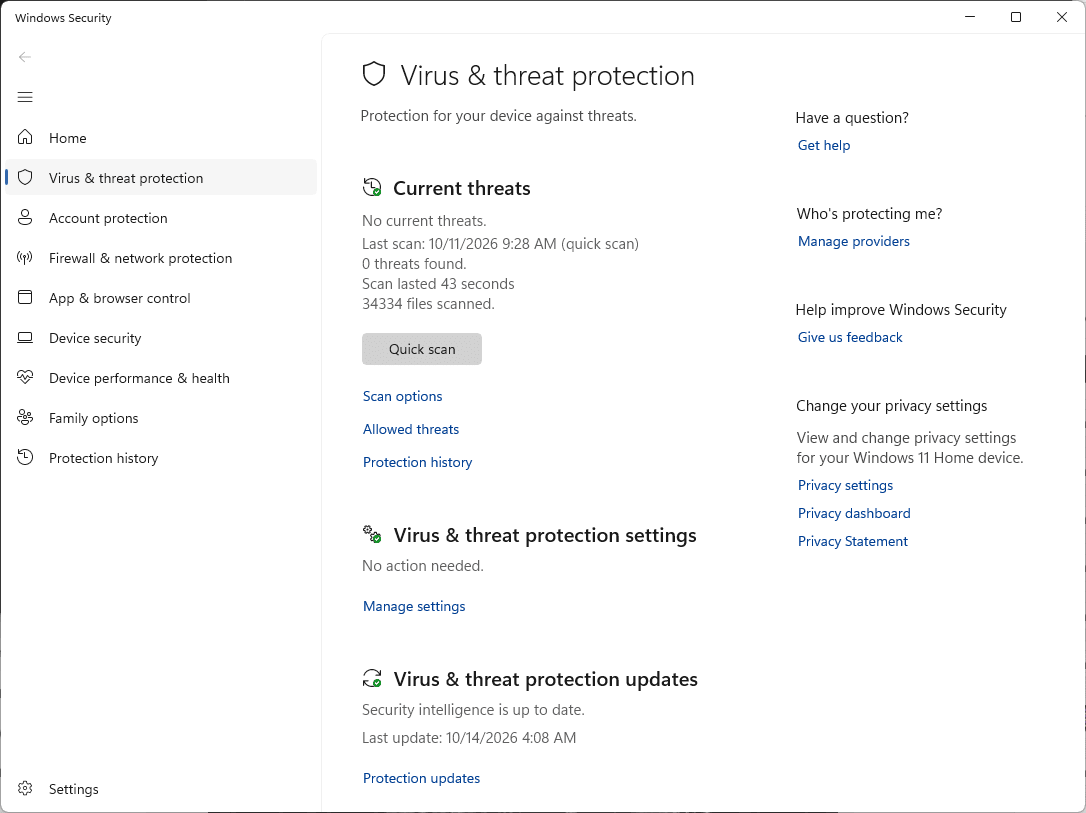
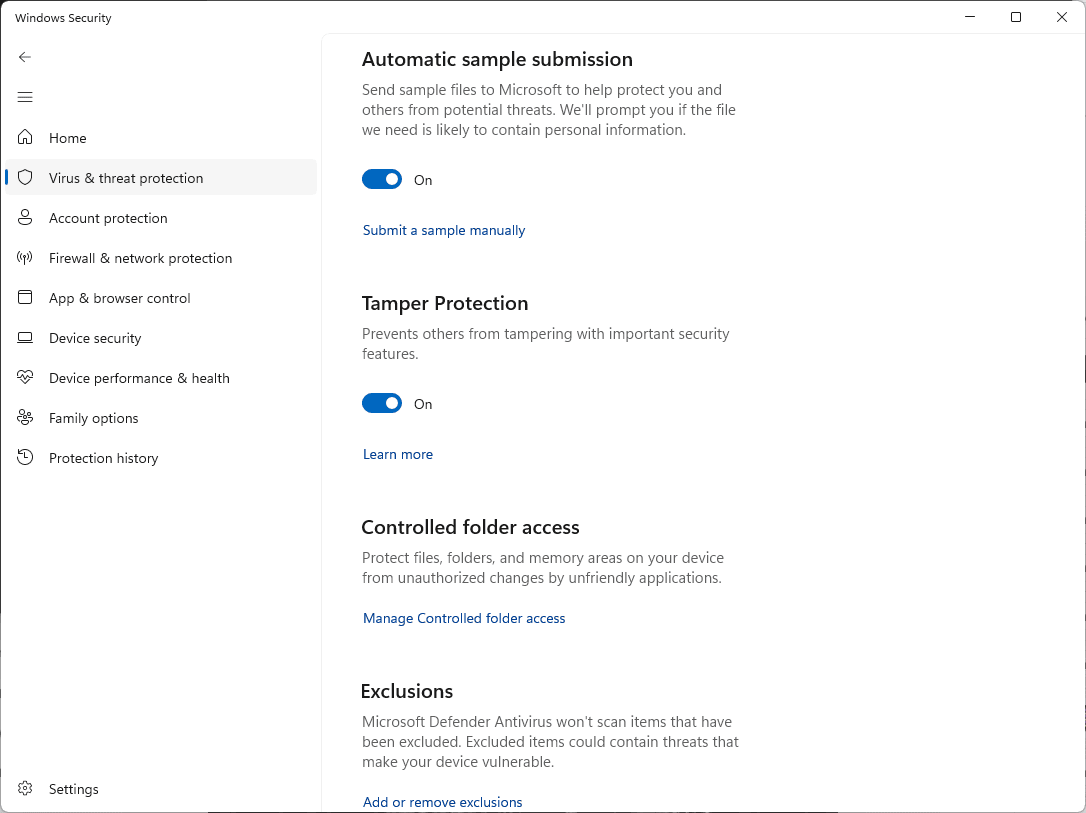
가이드: 제외, Protection history. 신고: 파일 제출.
Norton
- 복원: Security > Security History > Quarantine을 선택하고, Nexus 항목에서 Create exception & restore를 선택하세요.
- 폴더 허용: Security > Scans > Exclusions 탭 > Add를 클릭하고 Nexus 폴더를 선택하세요.
McAfee
- 복원: Navigation > Quarantined and Trusted Items > Quarantined Items에서 Nexus를 선택하고 Restore를 클릭하세요.
- 폴더 허용: Excluded Files and Folders를 열고(최신 버전에서는 Real-Time Scanning > Excluded Files) Nexus 폴더를 추가하세요.
McAfee 메뉴는 버전마다 다릅니다. 가이드: 격리, 복원, 파일 제외. 신고: McAfee 지원 사이트의 오탐 신고 옵션을 이용하세요.
Avast
- 복원: Protection > Quarantine에서 Nexus에 체크하고, 점 세 개를 클릭한 다음 Restore and add exception을 선택하세요.
- 또는 폴더 허용: Menu > Settings > General > Exceptions > Add exception > File / Folder.
AVG
- 복원: Menu > Quarantine에서 Nexus에 체크하고, 점 세 개를 클릭한 다음 Restore and add exception을 선택하세요.
- 또는 폴더 허용: Menu > Settings > General > Exceptions > Add exception > File / Folder.
가이드: 예외, 격리, Blocked & Allowed apps (랜섬웨어, 웹캠, 브라우저 경고용). 신고: 오탐 신고 양식.
Bitdefender
- 복원: Protection > Antivirus > Open > Settings > Manage quarantine으로 이동하세요. Create exception for the restored files를 켜고 Nexus를 선택한 다음 Restore를 클릭하세요.
- 또는 폴더 허용: Protection > Antivirus > Open > Settings > Manage Exceptions > +Add an Exception.
가이드: 제외, 격리. 신고: Bitdefender 개인용 지원 사이트의 오탐 신고 양식을 이용하세요.
Kaspersky
- 복원: Security > Quarantine(오른쪽 위)에서 Nexus를 선택하고 Restore를 클릭하세요.
- 폴더 허용: Settings > Security settings > Threats and exclusions > Manage exclusions > Add.
가이드: 제외, 복원. 메뉴는 버전마다 바뀝니다. 신고: OpenTIP.
ESET
- 복원: Tools > Quarantine에서 Nexus를 우클릭하고 Restore and exclude from scanning을 선택하세요.
- 또는 폴더 허용: F5를 누르고 Scan으로 이동해 Performance Exclusions 옆의 Edit을 클릭한 다음 Add를 클릭하세요.
Malwarebytes
- 복원: Detection History > Quarantined items에서 Nexus에 체크하고, Exclude this from future detections에도 체크한 다음 Restore를 클릭하세요.
- 또는 폴더 허용: Detection History > Allow list > Add item.
가이드: Allow list, 격리. 신고: 오탐.
Trend Micro
- 폴더 허용: Settings > Exception Lists > Programs/folders > Add > Browse에서 Nexus 폴더를 선택한 다음 Apply, OK 순서로 클릭하세요.
- Nexus가 이미 삭제되었다면 hellonexus.com/download에서 다시 다운로드하세요.
Avira
- 폴더 허용: 톱니바퀴 아이콘 > PC Protection > Real-Time Protection > Exceptions에서
C:\Program Files\Nexus\를 추가하세요(끝의 백슬래시가 중요합니다). - Nexus가 이미 삭제되었다면 Avira의 격리 보관함에서 복원하거나 다시 다운로드하세요.
메뉴는 버전마다 바뀝니다. 가이드: 파일 제외하기. 신고: 파일 제출.
Webroot
- Webroot를 열고 PC Security 톱니바퀴를 클릭한 다음 Block/Allow Files > Add File을 선택하세요.
- Nexus 폴더에서
Nexus.exe를 선택하고 Allow를 선택하세요. 격리에서 복원한 파일도 같은 목록에 나타납니다.
가이드: Blocking or allowing files. 신고: Webroot에 지원 티켓을 열고 오탐 옵션을 선택하세요.
Mac
Mac용 Nexus는 Apple의 서명과 공증을 받았습니다. Mac 보안 앱이 탐지하면 같은 방법으로 Nexus.app을 허용하세요.
그래도 탐지되나요?
어떤 백신 프로그램을 쓰는지 Discord에서 알려 주세요. 그리고 위의 링크를 이용해 해당 파일을 오탐으로 백신 제조사에 신고하세요.