
Antivirus en fout-positieven
Nexus is veilig. Als je antivirus Nexus heeft geblokkeerd of verwijderd, is dat een fout-positief. Nexus bestuurt ventilatoren, verlichting en sensoren op laag niveau, en antivirussoftware aanziet dat soms voor iets schadelijks. De desktop-app is open source, dus iedereen kan de code bekijken op github.com/hello-nexus. Download Nexus alleen via hellonexus.com/download.
De oplossing duurt ongeveer een minuut:
- Herstel Nexus uit de quarantaine van je antivirus.
- Sta de Nexus-map toe,
C:\Program Files\Nexus, in je antivirus en voer daarna het installatieprogramma uit of start Nexus opnieuw.
Zoek je antivirus
Microsoft Defender
- Als Windows "Windows protected your PC" meldt, klik dan op More info en daarna op Run anyway.
- Herstellen: open Windows Security > Protection history, open het item van Nexus en kies Restore. Wordt het opnieuw gemarkeerd, kies dan Actions > Allow on device.
- De map toestaan: Virus & threat protection > Manage settings > Add or remove exclusions > Add an exclusion > Folder.
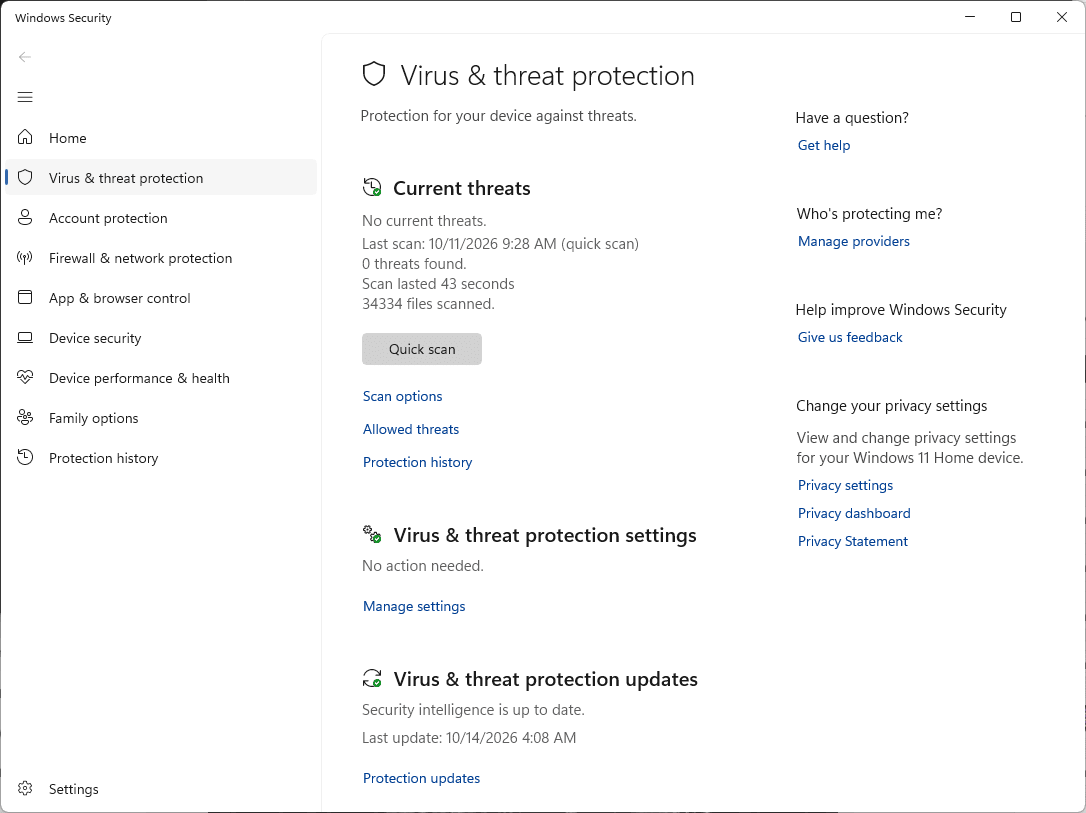
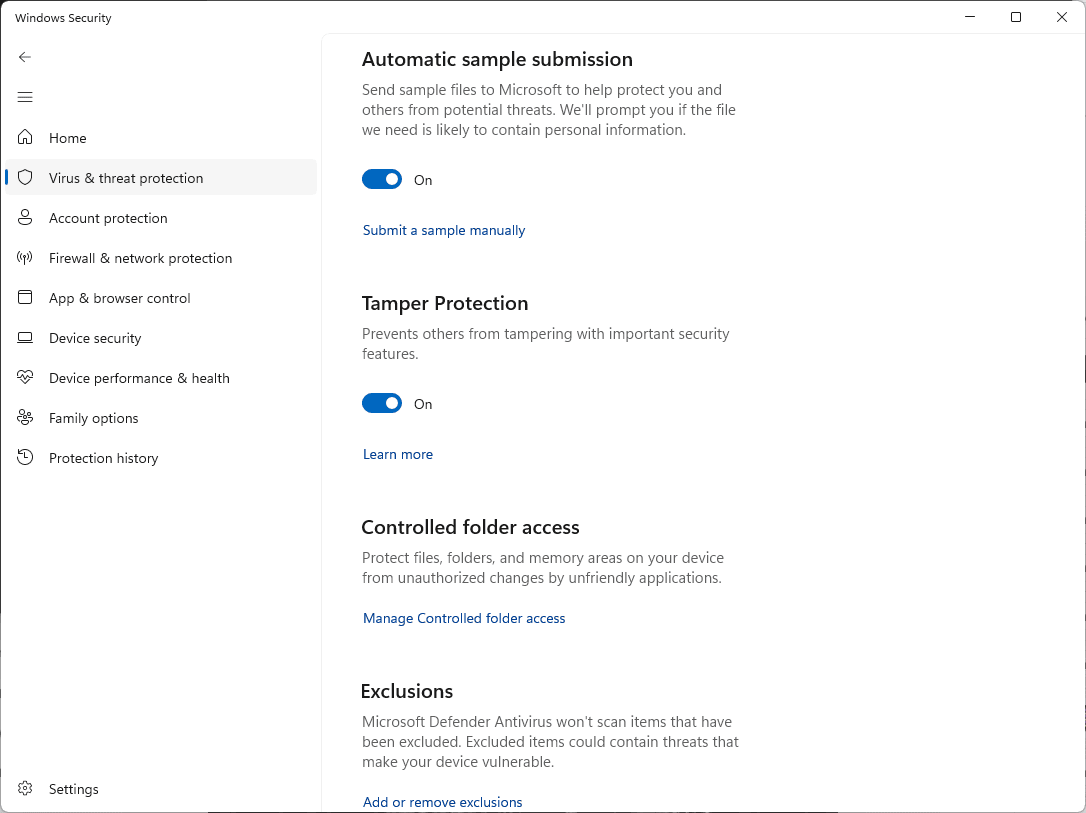
Handleidingen: uitsluitingen, Protection history. Melden: bestand indienen.
Norton
- Herstellen: Security > Security History > kies Quarantine en kies bij het item van Nexus Create exception & restore.
- De map toestaan: Security > Scans > tabblad Exclusions > Add en kies de Nexus-map.
Handleidingen: uitsluitingen, quarantaine. Melden: bestand indienen.
McAfee
- Herstellen: Navigation > Quarantined and Trusted Items > Quarantined Items, selecteer Nexus en klik op Restore.
- De map toestaan: open Excluded Files and Folders (in nieuwere versies Real-Time Scanning > Excluded Files) en voeg de Nexus-map toe.
De menu's van McAfee verschillen per versie. Handleidingen: quarantaine, herstellen, een bestand uitsluiten. Melden: gebruik de optie voor fout-positieven op de supportsite van McAfee.
Avast
- Herstellen: Protection > Quarantine, vink Nexus aan, klik op de drie puntjes en kies Restore and add exception.
- Of sta de map toe: Menu > Settings > General > Exceptions > Add exception > File / Folder.
Handleidingen: uitzonderingen, quarantaine. Melden: formulier voor fout-positieven.
AVG
- Herstellen: Menu > Quarantine, vink Nexus aan, klik op de drie puntjes en kies Restore and add exception.
- Of sta de map toe: Menu > Settings > General > Exceptions > Add exception > File / Folder.
Handleidingen: uitzonderingen, quarantaine, Blocked & Allowed apps (voor waarschuwingen over ransomware, webcam of browser). Melden: formulier voor fout-positieven.
Bitdefender
- Herstellen: Protection > Antivirus > Open > Settings > Manage quarantine. Zet Create exception for the restored files aan, selecteer Nexus en klik op Restore.
- Of sta de map toe: Protection > Antivirus > Open > Settings > Manage Exceptions > +Add an Exception.
Handleidingen: uitsluitingen, quarantaine. Melden: gebruik het formulier voor fout-positieven op de consumentensupportsite van Bitdefender.
Kaspersky
- Herstellen: Security > Quarantine (rechtsboven), selecteer Nexus en klik op Restore.
- De map toestaan: Settings > Security settings > Threats and exclusions > Manage exclusions > Add.
Handleidingen: uitsluitingen, herstellen. De menu's veranderen per versie. Melden: OpenTIP.
ESET
- Herstellen: Tools > Quarantine, klik met de rechtermuisknop op Nexus en kies Restore and exclude from scanning.
- Of sta de map toe: druk op F5 > Scan > Edit naast Performance Exclusions > Add.
Handleidingen: uitsluitingen, herstellen. Melden: een voorbeeld indienen.
Malwarebytes
- Herstellen: Detection History > Quarantined items, vink Nexus aan, vink Exclude this from future detections aan en klik op Restore.
- Of sta de map toe: Detection History > Allow list > Add item.
Handleidingen: Allow list, quarantaine. Melden: fout-positief.
Trend Micro
- De map toestaan: Settings > Exception Lists > Programs/folders > Add > Browse, kies de Nexus-map en klik op Apply en OK.
- Is Nexus al verwijderd, download het dan opnieuw via hellonexus.com/download.
Handleiding: uitzonderingenlijst. Melden: een voorbeeld indienen.
Avira
- De map toestaan: tandwiel > PC Protection > Real-Time Protection > Exceptions en voeg
C:\Program Files\Nexus\toe (de backslash aan het eind is belangrijk). - Is Nexus al verwijderd, herstel het dan uit de quarantaine van Avira of download het opnieuw.
De menu's veranderen per versie. Handleiding: bestanden uitsluiten. Melden: bestand indienen.
Webroot
- Open Webroot, klik op het tandwiel van PC Security en kies Block/Allow Files > Add File.
- Kies
Nexus.exein de Nexus-map en selecteer Allow. Bestanden die je uit de quarantaine hebt hersteld, staan in dezelfde lijst.
Handleiding: Blocking or allowing files. Melden: open een supportticket bij Webroot en kies de optie voor fout-positieven.
Mac
Nexus voor Mac is ondertekend en door Apple genotariseerd. Markeert een beveiligingsapp op je Mac het toch, sta Nexus.app dan op dezelfde manier toe.
Nog steeds gemarkeerd?
Vertel ons op Discord welke antivirus je gebruikt en meld het bestand bij de leverancier van je antivirus als fout-positief via de links hierboven.